Defining "Moderate"
Merriam Webster: “Moderate”
“Moderate: avoiding extremes of behavior or expression, observing reasonable limits; tending toward the mean or average amount or dimension; (transitive verb): to lessen the intensity or extremeness of; to preside over or act as chairman of.”
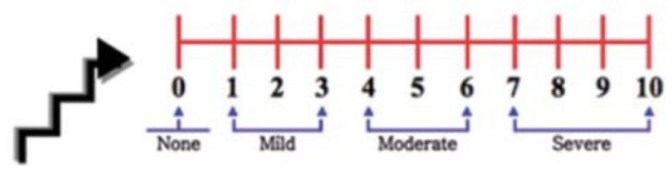
Middle. Not mild; not severe; more, well, milquetoast. That would be an adjective. We are going to look at the “transitive verb” as described above, specifically, “to preside over.” Librarians moderate all the time, through our collection and weeding policies, and the hosting of events, whether live or virtual.
The Impermanence of Online Content
Any company that has a website or social media presence had better moderate it well. Why? Weell...

OK, so it is possible that it’s not forever, but know this: anyone can take a screenshot or record their own screens. As a matter of fact, there are websites that actually make money by **“harvesting”** what others post on the Internet, and aggregating those data points into informational websites. The Wordpress blog says a “content aggregator site collects information from all over the web and posts it in one location for visitors to access. The topics are created around various keywords using **RSS [Really Simple Syndication]** feeds. A content aggregator site will often provide attribution and a link to the original site to avoid plagiarism claims. There are a few different ways for an aggregator site to operate, but, generally, they don’t produce content of their own.”
RSS Feeds and Curation
Now, I usually just bookmark or visit sites directly if I want information. However, if you’d like to get fancy and aggregate your own, **Feedly** is the RSS reader that appears to be number one right now in 2021. Vicki Volvoski from Zapier says, “Feedly is one of the first RSS reader apps you'll hear mentioned if you ask people how they follow sites today. It's not hard to see why—its clean and simple interface is a great solution for both casual readers who just want to see all of their websites in one place and power users who want to take advantage of every feature RSS apps have to offer. Feedly's free plan offers most of the features casual readers need. Follow up to 100 sources, sort the sites you follow into topical categories, watch YouTube videos, and read full-text articles (when available) in a distraction-free, minimalist view. Plus, Feedly offers mobile apps for Android and iOS devices, so you can access subscriptions easily both at home and on the go.”
Since “RSS feeds” were first on the Internet (1999), social media simply followed by naming their formats in the same manner. Facebook calls their main landing page a “newsfeed.” When you follow people on Twitter, it’s a “Twitter feed.” Most other social media companies will follow the same format, because it makes sense.
The neat thing about RSS feed readers like Feedly is that they allow consumers to cut out the middleman: **those very same social media companies that copied them.**
Personal Moderation
Coming back to the above word, “moderate,” there are many ways you can moderate your own news and information sources. RSS feeds are an old way, but they have stuck around because they work.
As to the big social media companies, both Facebook and Twitter have good “help pages” that allow users to better control what is in the feeds from those sites (Help page links are the names).
References
- Image of “Nothing Lasts Forever” from: https://blogs.ubalt.edu/library/2019/04/13/the-internet-may-not-be-forever/. (Placeholder: `nothing_lasts_forever_image_placeholder.jpg`)
- Image of “Moderate” from: https://www.mjdrdypu.org/viewimage.asp?img=MedJDYPatilUniv_2012_5_2_129_103341_u3.jpg.
- Merriam-Webster. (2021). Define: Moderate. Retrieved from: https://www.merriam-webster.com/dictionary/moderate.
- Volvovski, Vicki. (2018). The 10 Best Free RSS Reader Apps. Retrieved from Zapier Website: https://zapier.com/blog/best-rss-feed-reader-apps/.
- Wordpress Blog Themeisle. (2021). Seven Great News Aggregator Websites You Should Check Out (Plus How To Build Your Own). Retrieved from: https://themeisle.com/blog/news-aggregator-websites-examples/.
