Computer Security and Privacy
I never want to intimidate our patrons or computer users, but it’s helpful to know about different privacy issues - you really can’t trust anyone. Not even me. Do you remember *Goodfellas* from 1990? It’s helpful to “think like a mobster” when dealing with privacy issues. Not to that extent, mind you! But these lines stand out to me: “Henry Hill (Ray Liotta): [narrating] Paulie (Paul Sorvino) may have moved slow, but it was only because Paulie didn't have to move for anybody. … Paulie hated phones. He wouldn't have one in his house. He used to get all his calls second hand, then you'd have to call the people back from an outside phone. There were guys, that's all they did all day long was take care of Paulie's phone calls.”

I’m joking, but only a bit. Many of us know that standard USB drives (or flash drives, same thing) can be loaded with viruses or other malicious software, and thus shouldn’t be plugged into computers. What do you do if you find one? Give it to your work’s IT staff, or just leave it alone. **It’s hard to go wrong if you leave stuff alone!**
On this note, I attended a webinar and this example came up: A bank was testing the security of their systems by leaving “unattended” USBs on the counters and even the floors. It was found that bank staff would pick them up and plug them into work computers to “find out who they belonged to.” **This is a security breach!**
The universal reaction in the webinar was one of general disbelief: Either people knew that was a bad thing to do, or, they had no idea. My reaction was a little different: I told the presenter, because I work in a library (not a bank, good grief, security should be like a hospital there!) I might pick up the unattended USB and purposely plug it into my work computer - because there’s an IT staff to help clean up any mess that happens! I don’t have that kind of support at home (I’m the IT staff)!
We all laughed, he mentioned that libraries are fantastic, and said something like, “Well, yes, that’s one way to look at it!” We also discussed the fact that many libraries around the US have programs like **Deep Freeze** to protect users’ privacy. Basically, Deep Freeze allows patrons to use public computers for their business purposes, and once finished, the patron restarts the computer. Once restarted, Deep Freeze wipes off all saved items, browser history, settings, and anything else that the patron changed during the session. The computer reboots as if it had never been used before. This is only useful for public computers - you don’t want to wipe information off your own computer at home!
So what other items should your patrons be aware of as to computer device security? There are legion, but I’ll highlight a few here:
“Charging” cables: Those pesky USB ends hold memory chips or WiFi cards that are then controllable once plugged into your device. Remember, all USB ports have electricity running through them, so when you plug in a USB device, it powers on.
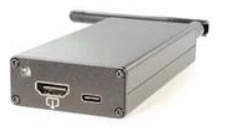
“Screen Crab:” This HDMI “connector” grabs screenshots of the incoming device (like a TV or Computer). It can record images to a microSD card and it can stream them over the web, allowing people to see the connected device in real time. I need to be honest here: I think I’d be interested in this as a device to help my mother when she has computer trouble!
“WiFi Pineapple:” This is not something our patrons might accidentally plug into their devices, but it is something that hackers can easily set up to spoof other networks. For example, I use the WalMart app on my phone. It works in the store, connected to that store’s wifi, and gives me prices of scanned merchandise and locations of things I search for. This is handy, for sure! But what if there’s a pineapple connected nearby? It would imitate the WalMart network, my phone would connect to it, and boom! I’m being hacked.
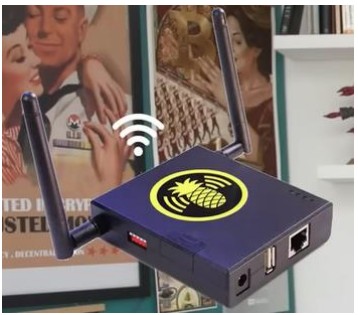
Anything I do on that wifi could be seen and recorded by criminals. What if I checked my banking app? Poof! Criminals have that information: What my bank is, account numbers, and other private information that has nothing to do with WalMart! Protect yourself by **turning off the wifi before you go into a banking app - only use your cellular data plan**. This is what I do constantly. It’s not always easy to remember, but it’s worth the effort!
The basis of this post came from NBTV, an account I follow on Instagram. She also has a YouTube channel. The hacking tools video is here: NBTV Youtube Channel